

From a 4-year Amazon UAE & Noon UAE Brand Owner
Getting reviews on Amazon UAE is one of the most important factors for improving trust, conversion rate, and product ranking. In this guide, you will learn how to get reviews on Amazon UAE safely using proven strategies that follow Amazon’s policies.
Before reading this, make sure your listing is fully optimized — because a strong listing increases conversions and naturally leads to more reviews over time. Read our How to List & Optimize Products on Amazon UAE guide first. And if you are just starting out, our How to Start Selling on Amazon UAE guide covers everything from account setup to your first live listing.
Do Reviews Really Matter on Amazon UAE?
Most sellers assume that reviews are the primary driver of sales. My experience on Amazon UAE and Noon UAE tells a more complex story. I have had two products generate consistent sales from day one with zero reviews and no star rating — because the listing was strong, the price was right, and the product matched exactly what buyers were searching for. At the same time, two other products with five-star ratings and several reviews sat with almost no sales for months.
This experience reveals an important truth: reviews support sales but they do not replace the fundamentals. A product with weak demand, poor listing quality, or wrong pricing will not be saved by reviews. A product with genuine market demand, a competitive price, and a well-optimized listing can start selling even before the first review arrives.
That said — reviews matter enormously once a product is selling. They build buyer confidence, improve conversion rate, support your ranking, and separate your listing from competitors over time. The goal is not to obsess over reviews before launch — it is to build a review strategy that runs consistently from day one alongside everything else.
Why Getting Reviews on Amazon UAE Is Difficult

Here is something every experienced UAE seller knows but few guides acknowledge openly: getting organic reviews from customers in 2026 is genuinely difficult. The reason is simple — online shopping in the UAE is no longer a novelty. A few years ago, receiving a package at home felt exciting and buyers were motivated to share their experience. Today, e-commerce is as routine as buying groceries. UAE consumers order online daily, including food, household essentials, and personal care — and they simply do not feel the need to stop and write a review for every purchase.
There is also a deeply frustrating imbalance in customer behaviour that every UAE seller experiences. A buyer who receives their order on time, finds the product exactly as described, and is completely satisfied will almost never leave a review — they move on with their day. But a buyer who experiences even a minor issue — a slight delay, packaging that was slightly damaged, or a product that did not match their expectations exactly — will often leave a negative review immediately. Unhappy customers are far more motivated to write than happy ones. This is the bitter reality of online selling and it applies globally — but it is particularly pronounced in the UAE market where buyer expectations for speed and quality are high.
Step 1: Launch Strategy — Generating Your First Reviews Safely
When launching a new product on Amazon UAE, the biggest challenge is getting your first few reviews. Without reviews, buyers hesitate — which reduces conversion rate and slows down your sales momentum.
The safest and most effective approach is to focus on generating real sales first. Reviews follow sales — not the other way around. Your goal in the early stage is to create conditions where real customers buy your product and leave feedback naturally.
Safe Ways to Generate Initial Reviews
- Launch with a competitive price — lower pricing increases early conversions
- Drive traffic using social media or ads — more buyers = more review opportunities
- Use Amazon Vine if available — this is Amazon’s official program for getting initial reviews
- Deliver excellent product quality and packaging — satisfied customers are more likely to leave reviews
- Use the Request a Review button consistently on every order
The honest reality of launching a new product on Amazon UAE or Noon UAE is that waiting for organic reviews to arrive on their own is not a viable strategy. Every experienced seller — without exception — uses a launch strategy to generate their first set of reviews. This is not a secret in the seller community. It is an accepted and understood part of the launch process.
The standard approach when a new product goes live is to arrange 5 to 6 initial orders through people you know and trust — family members, friends, colleagues, or individuals specifically recruited for this purpose. These buyers purchase the product through Amazon or Noon as normal customers, receive and use the product, and leave an honest 5-star review with genuine written feedback about their experience.
This gives your listing the social proof it needs to be taken seriously by new buyers visiting for the first time. A listing with 5 reviews and a 5-star rating converts significantly better than an identical listing with zero reviews. Those initial reviews also signal to Amazon's algorithm that your product is generating engagement — which supports early ranking momentum. Once organic sales begin, organic reviews will gradually follow — but you need those first reviews to get the sales started.
Important Guidelines for Initial Reviews
- The people leaving reviews must genuinely purchase and receive the product — not simply leave a review without buying
- Reviews must be written honestly and describe the actual product — not generic or obviously scripted text
- Do not use the same Amazon or Noon account for multiple reviews on your listing — each reviewer must use their own separate account
- Space the reviews out over several days — multiple reviews on the same day from new accounts is a pattern Amazon's system monitors
- Never offer payment or incentives in exchange for reviews — this violates Amazon's policies and carries serious account suspension risk
Step 2: Request a Review Button — Use It on Every Order
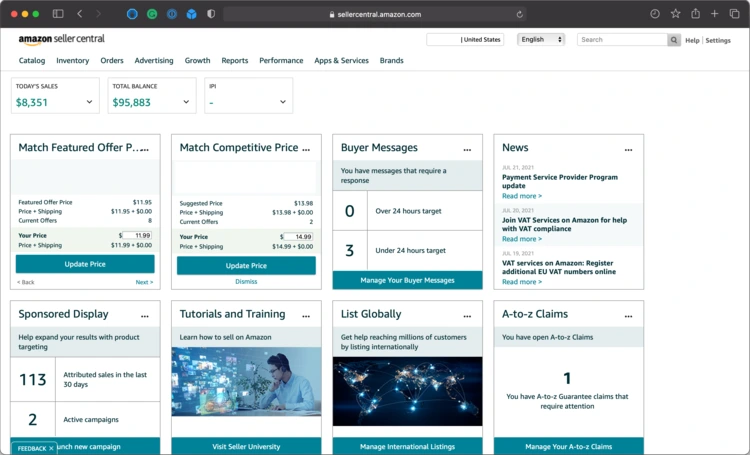
Amazon provides sellers with a built-in tool called the Request a Review button inside Seller Central. For every order that has been delivered, you can send an official Amazon-branded review request email to the buyer. This email is sent by Amazon — not by you directly — which means it carries Amazon's credibility and is not considered a violation of any policy.
This is the safest and most recommended way to get reviews on Amazon UAE because the request is sent directly by Amazon and follows all platform policies.
How to Use the Request a Review Button
- Go to Seller Central → Orders → Manage Orders
- Open any delivered order and look for the 'Request a Review' button
- Click it — Amazon sends a standardised email asking the buyer to leave a product review and seller feedback
- You can only send this request once per order and only between 5 and 30 days after delivery
- Use it on every single delivered order without exception — it takes seconds and is your most reliable organic review tool
Step 3: Using Product Insert Cards to Get Reviews

A product insert card is a small printed card placed inside your product packaging that communicates directly with the buyer after they receive their order. Done correctly, insert cards are a powerful tool for encouraging reviews and building customer loyalty. Done incorrectly, they can violate Amazon's policies and put your account at risk.
What a Good Insert Card Should Include
- A thank you message for their purchase — warm and genuine, not corporate
- A simple request to leave a review if they are happy with the product — one clear sentence is enough
- Your brand name and logo — builds brand recognition for repeat purchases
- A QR code linking directly to your Amazon listing's review page — makes it as easy as possible for the buyer to leave a review
What Insert Cards Must NOT Include
- Any offer of a discount, gift, or incentive in exchange for a review — this is a direct violation of Amazon's policies
- Any instruction to leave only a positive review — you can ask for a review but not specify what kind
- Any request to contact you before leaving a negative review — Amazon considers this review manipulation
Keep your insert card simple, genuine, and focused on thanking the customer. A well-designed insert card that simply says 'We hope you love your product — if you do, a review means the world to us' is both effective and fully compliant.
Amazon UAE vs Noon UAE Reviews — Key Differences
One of the clearest differences between Amazon UAE and Noon UAE — from direct experience — is that getting reviews and 5-star ratings on Noon is significantly easier than on Amazon. Noon's buyer base is more engaged with the review process and the platform actively encourages buyers to rate their purchases. As a result, organic review rates on Noon tend to be higher than on Amazon for the same product.
For new sellers who are struggling to build initial reviews, this is an important strategic consideration. Launching on Noon first — or alongside Amazon — can help you build a review foundation faster, which then builds your confidence and provides learnings you can apply to your Amazon launch strategy.
Additionally, ranking on Noon UAE is easier than on Amazon UAE as we covered in our Amazon UAE vs Noon UAE comparison guide. The combination of easier ranking and better organic review rates makes Noon an excellent starting platform for building momentum before scaling on Amazon.
How to Handle Negative Reviews on Amazon UAE

Negative reviews are inevitable. Every seller with enough reviews will eventually receive one — regardless of product quality or service level. How you respond to negative reviews matters both for your reputation and for your ranking.
Respond Publicly and Professionally
Amazon allows sellers to respond publicly to reviews. When a negative review appears, respond within 24 to 48 hours. Keep your response calm, professional, and solution-focused. Thank the buyer for their feedback, acknowledge their experience, and offer to resolve the issue. A professional response shows future buyers that you stand behind your product and take customer experience seriously — which can actually increase buyer confidence despite the negative review.
Never Argue or Become Defensive
Responding aggressively or dismissively to a negative review is one of the worst things a seller can do publicly. Future buyers read your responses and form judgments about your brand. A seller who responds with patience and professionalism to a critical review demonstrates confidence and integrity. A seller who argues or makes excuses damages their own reputation far more than the original review did.
Request Removal for Policy-Violating Reviews
If a review contains false information, personal attacks, or content that violates Amazon's review policies, you can report it for removal through Seller Central. Amazon will review the report and remove reviews that genuinely violate their guidelines. This process takes time and is not guaranteed, but it is worth pursuing for reviews that are clearly unfair or inaccurate.
What NOT to Do When Getting Reviews on Amazon UAE
While the launch strategy described above is widely practised, there are approaches to review generation that cross a clear line and carry serious risk of account suspension or permanent ban from Amazon. Every seller must understand where that line is.
- Never purchase reviews from third-party services — Amazon actively detects fake review patterns and regularly suspends accounts involved in review manipulation schemes
- Never use the same household IP address or device for multiple reviewer accounts — Amazon tracks this and flags it as coordinated review manipulation
- Never offer refunds, discounts, or free products in exchange for a review — this is explicitly prohibited and Amazon buyers sometimes report these offers directly to Amazon
- Never create fake buyer accounts yourself to leave reviews on your own listing — Amazon's systems are sophisticated and this is detectable
- Never ask buyers to change or remove a negative review in exchange for any benefit — this is review manipulation and a serious policy violation
Key reminder: Amazon's account suspension process can be fast and devastating — losing your seller account means losing all your inventory, your reviews, your ranking history, and your business. No shortcut to reviews is worth that risk. Work within the boundaries and build sustainably.
Final Thoughts on Getting Reviews on Amazon UAE
Reviews on Amazon UAE and Noon UAE are important — but they are one part of a bigger picture. A product with genuine demand, a strong listing, a competitive price, and consistent sales velocity will accumulate reviews over time. Your job as a seller is to create the conditions for that to happen: start with a careful launch strategy to build initial social proof, use every legitimate tool available to encourage organic reviews, respond professionally to negative feedback, and stay firmly within the rules.
The sellers who obsess over reviews at the expense of everything else miss the point. The sellers who build reviews as part of a complete, well-executed selling strategy are the ones who build lasting businesses on Amazon UAE.
For everything else in your selling journey, read our complete guide series: How to Find Winning Products, How to Start Selling on Amazon UAE, How to List & Optimize Products, How to Rank Your Product, and Amazon UAE Pricing Strategy.
— Written by a 4-year Amazon UAE & Noon UAE Brand Owner
Frequently Asked Questions
Real questions from Amazon UAE sellers about getting reviews — answered directly.
How many reviews do I need before my product starts selling consistently?
There is no fixed number — but from experience, having 5 to 10 genuine reviews with an average rating above 4.0 stars is enough to compete in most categories on Amazon UAE. At this point buyers have enough social proof to make a purchase decision confidently. In lower competition niches, even 3 to 5 reviews can be sufficient. In highly competitive categories with established sellers who have hundreds of reviews, you will need more — but focus on getting those first 5 to 10 before worrying about that.
Can I ask my customers directly for a review via Amazon messaging?
Amazon's Buyer-Seller Messaging system can be used for legitimate order-related communication, but sending unsolicited review requests through this channel is against Amazon's policies. The correct tool for requesting reviews is the official Request a Review button in Seller Central — this sends an Amazon-branded request that is fully compliant. Do not attempt to replicate this through direct messages.
Does the number of stars affect my Amazon UAE ranking?
Star rating affects ranking indirectly — through conversion rate. A listing with a higher average star rating converts more visitors into buyers, and higher conversion rate signals to Amazon's algorithm that your product is relevant and desirable, which supports ranking. A product with a 4.5-star rating will almost always out-convert the same product with a 3.5-star rating at the same price. So while Amazon does not directly rank you higher for having more stars, the conversion rate impact makes star rating a meaningful indirect ranking factor.
What should I do if a competitor is leaving fake negative reviews on my listing?
Report each suspicious review through Seller Central using the 'Report abuse' option. Document patterns — multiple reviews from new accounts, similar language, reviews appearing in a short time window — as these are evidence of coordinated abuse. Contact Amazon Seller Support directly with your documentation. Amazon takes review abuse seriously and will investigate. If you are Brand Registered, you have additional tools through the Brand Registry dashboard to report and escalate review abuse cases.