

If you want to start selling on Amazon UAE in 2026, this step-by-step guide will show you exactly how to register, get your license, open the right bank account, and launch your first product legally in the UAE. The opportunity is still strong, but competition is growing fast.
I've been a brand owner on Amazon UAE and Noon UAE for the past 4 years. In this Amazon UAE seller guide, I'm sharing what actually worked for me, the mistakes to avoid, and the exact steps I would follow if I were starting from scratch in 2026.
Why Sell on Amazon UAE in 2026?
Amazon.ae is not the same beast as Amazon US or Amazon UK. The UAE market has its own dynamics: a high-spending, multicultural customer base, lower competition than Western marketplaces, and a growing preference for online shopping that has accelerated significantly over the last few years.
As a brand owner here, I can tell you that the opportunity is real. But you need to approach it the right way — especially when it comes to the legal side, which most guides skip over or gloss over entirely. Here's the honest truth: you cannot start selling legally on Amazon UAE without proper documentation. Amazon will ask for it during registration, and if you try to shortcut this, your account will get flagged or suspended before you even make your first sale.
Amazon UAE Trade License Requirements for Sellers
Before you register on Amazon, you need a legal business identity. For most individuals starting out — whether you're a UAE national, a GCC citizen, or an expat resident — the simplest and most affordable route is the E-Trader License issued by Dubai's Department of Economy & Tourism (DET).
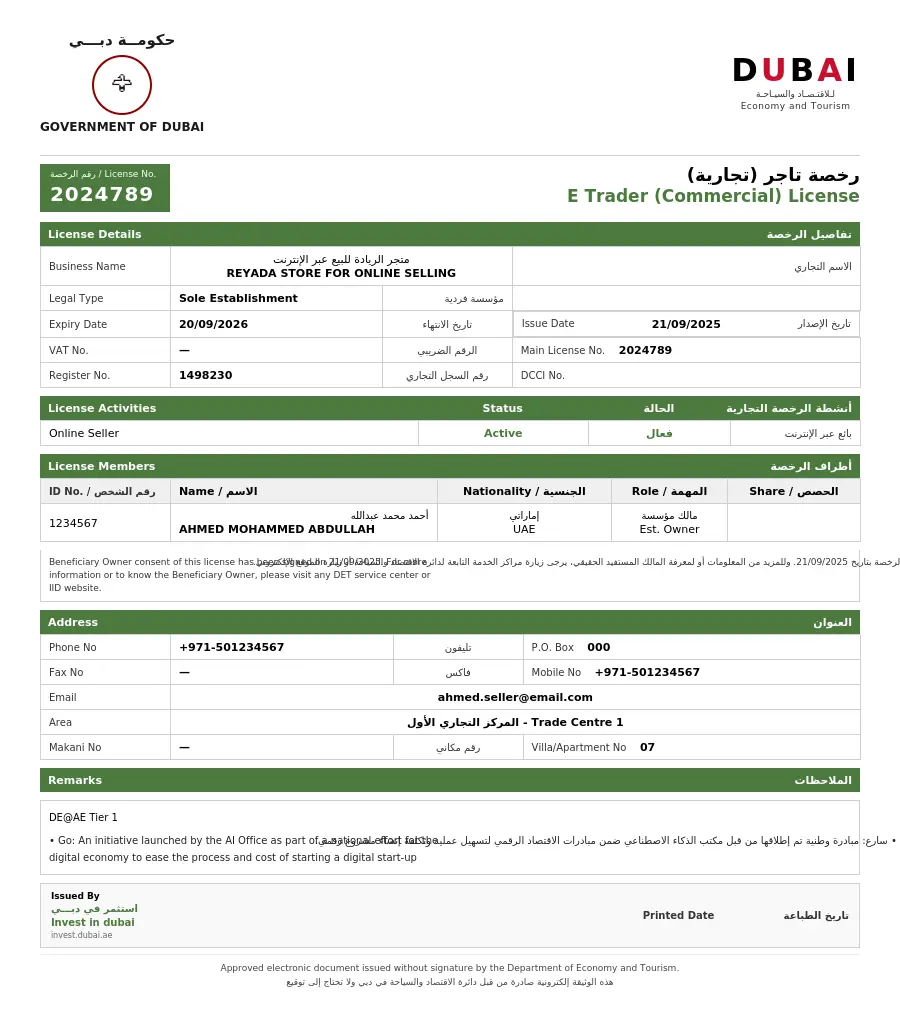
What the E-Trader License gives you:
- No physical office or shop required — you run everything from home
- Entire application is 100% digital and takes less than 10 minutes
- Cost: AED 1,070 per year + AED 300 Dubai Chamber membership fee
- No local sponsor or business partner needed
- License is issued to individuals, not companies — perfect for solo sellers
Who can apply?
You must be at least 21 years old, hold a valid UAE residence visa, and have an Emirates ID. GCC nationals can also apply. If you are a non-GCC expat, note that the E-Trader license typically permits service-based activities online. To sell physical products as an expat, you will generally need a commercial e-commerce license — this is something many guides don't mention, so check the permitted activities under your license before registering on Amazon.
How to apply:
Go directly to the official Invest in Dubai portal: www.investindubai.gov.ae. Log in with your Emirates ID and UAE Pass, select your business activity, reserve a trade name, and pay the fee. You'll receive your license electronically within 3–5 business days. Keep a digital copy — you'll need it when registering with Amazon.
Best UAE Bank Account for Amazon Seller Payments
Amazon pays your earnings directly to a UAE bank account — so this step is non-negotiable. But here's what nobody tells you upfront: not every UAE bank IBAN is accepted by Amazon. I learned this the hard way, and I want you to have the full picture before you open anything.
As a brand owner with 4 years on these platforms, here is the honest breakdown I give every new seller who asks me:
First, the critical thing to understand about Amazon vs. Noon
Amazon UAE does not accept local UAE IBANs from all banks. Specifically, Mbank and Ruya Bank both issue local UAE IBANs — and Amazon currently does not accept these for disbursements. So if you're selling on Amazon, you need to plan your banking accordingly. Noon UAE, however, does accept these banks without any issue. So the bank you choose depends entirely on which platform you're starting with.

Option A: Mbank — Best for Noon sellers & zero-cost start
Website: www.mbank.ae
If you're starting on Noon UAE, or you simply want a free account to manage your business finances with zero overhead, Mbank is my top recommendation. As a new seller trying to keep costs low, this is the smartest move:
- Completely free — zero monthly fees, zero minimum balance, no hidden charges
- Open your account in under 5 minutes via the Mbank app using your UAE Pass
- Virtual debit card issued instantly, physical card available on request
- Fully licensed by the Central Bank of the UAE
Option B: Ruya Bank — Shariah-compliant, Noon-compatible
Website: www.ruyabank.ae
If you prefer Islamic banking, Ruya is a solid digital option. Like Mbank, its IBAN is local UAE — accepted on Noon but not on Amazon. Worth it if Shariah compliance is a priority for you, but factor in the monthly cost:
- 100% Shariah-compliant with full transparency
- Business account opened online in around 20 minutes
- Monthly fee: AED 79 — keep this in mind as a new seller
Option C: Wio Bank — The one that works on Amazon UAE
Here's where it gets practical. If Amazon UAE is your primary platform, you need a bank whose IBAN Amazon accepts — and from my experience, Wio Bank works. It's a digital business bank, straightforward to set up, and its IBAN is recognised by Amazon for disbursements. The trade-off is the monthly fee:
- Monthly fee: AED 99 — higher than the others, but the only digital option that works directly with Amazon UAE
- Full business banking features including transfers, cards, and account management
- Designed for SMEs and freelancers in the UAE
How to Register an Amazon UAE Seller Account
Go to sell.amazon.ae and click "Start Selling." You can use an existing Amazon customer account or create a new one with your business email address.

Documents you'll need ready:
- Emirates ID (front and back)
- Your trade or e-commerce license
- A recent bank statement or utility bill (dated within the last 90 days) for address verification
- Your UAE bank account IBAN number
- A valid mobile number and email address
Individual vs. Business Account:
- If registered as an individual (E-Trader license in your name) → choose Individual Seller Account
- If you have a company trade license → choose Business Seller Account, and make sure the business name on Amazon matches exactly what's on your license
Identity Verification:
After submitting your details, Amazon's Seller Identity Verification team typically reviews your application within 2–3 business days. You'll receive an email with the status. If they request additional documents, respond quickly — delays here push back your launch date significantly.
How to Set Up Seller Central and Create Your First Amazon UAE Listing
Once your account is approved, you'll have access to Seller Central — your command centre for everything Amazon-related. Inventory, orders, payments, advertising, account health — it all lives here. When you're ready to create your first product listing, read our detailed guide on How to List & Optimize Products on Amazon UAE — it covers everything from writing your title to running social media ads.
Do these immediately after approval:
- Set your store name carefully — this is what customers see and is part of your brand identity from day one
- Go to Settings → Account Info → Payment Information → Deposit Methods, and enter your IBAN
- Review your account health dashboard — keep this green from the very beginning
Creating your first product listing:
Every product needs a GTIN (barcode). If you're selling your own brand, you'll need a UPC or EAN code from GS1 (the official barcode registry). If you're reselling an existing product, you can match it to an existing listing.
Your listing needs: a keyword-optimized title, high-quality images (minimum 1000x1000 pixels with a white background for the main image), clear bullet points covering key features, a detailed product description, and competitive pricing.
Amazon UAE FBA vs FBM: Which Fulfillment Method Is Better?
You have two main options, and your choice here significantly impacts your cash flow and operations:
Fulfilled by Merchant (FBM)
You store the products yourself and ship orders directly to customers. Lower upfront cost, but you're responsible for storage, packaging, and delivery speed. Great for testing demand before committing to inventory at Amazon's warehouse.
Fulfilled by Amazon (FBA)
You send your inventory to Amazon's UAE fulfillment center. Amazon handles storage, picking, packing, and shipping every order. Your products become eligible for Prime delivery, which boosts conversion rates significantly.
How to Launch Your Amazon UAE Store Successfully in the First 90 Days
Getting your account live is just the beginning. The UAE market rewards sellers who actively invest in visibility. Here are the most important moves in your first three months:
Get your first reviews
Reviews are the lifeblood of Amazon sales. Amazon's "Request a Review" button in Seller Central lets you send an automated review request to buyers. Use it on every single order, without exception. Nothing moves product faster than a strong review count.
Run Sponsored Products ads
Even AED 20–30 per day can dramatically increase visibility when your organic ranking is still low. Start with automatic campaigns to discover which keywords convert, then build manual campaigns around your winners. Advertising on Amazon UAE is still cheaper than in most Western marketplaces — take advantage of that.
Monitor Account Health obsessively
In Seller Central, Account Health shows your order defect rate, late shipment rate, and policy compliance. Keep everything green. Amazon can restrict or suspend accounts that fall below their thresholds, and getting reinstated is a slow and painful process — one I'd prefer you never have to experience.
Know your numbers before you scale
Amazon charges referral fees (a percentage of the sale price, varying by category) plus FBA fulfillment fees if you use FBA. Know your landed cost, Amazon fees, and advertising spend before you decide on a selling price. Profitability on Amazon is absolutely achievable, but only if you've done the math upfront.
Is Selling on Amazon UAE Worth It in 2026?
Yes — but only if you treat it like a real business from day one, not a side hustle you figure out as you go along.
The UAE market is still less saturated than Amazon US or Amazon Europe. That window of lower competition will not stay open forever. The sellers who win here are the ones who got their legal setup right, chose their products carefully, invested in professional listings, and stayed consistent with advertising and customer service.
I started exactly where you are right now. The steps above are what I wish someone had laid out clearly for me when I was getting started. Follow them in order, don't skip the licensing and banking steps, and you'll be in a stronger position than the majority of people who try to rush through registration without a proper foundation.
Good luck — and welcome to the Amazon UAE seller community.
— Written by an Amazon UAE & Noon UAE Brand Owner
Frequently Asked Questions
Quick answers to the questions every new Amazon UAE seller asks — from someone who has been through all of it.
Can expats sell on Amazon UAE?
Yes, but with a condition. Expats need a valid UAE residence visa and Emirates ID. The E-Trader license is available to residents, but it typically covers service-based activities. To sell physical products as an expat, a commercial e-commerce license is the safer and correct route.
How much does it cost to start selling on Amazon UAE?
Minimum realistic budget: E-Trader license AED 1,070/year + Dubai Chamber AED 300 + bank account (free with Mbank if selling on Noon, AED 99/month Wio Bank for Amazon) + your first product inventory. You can realistically get started for AED 3,000–5,000 if you keep product costs lean.
How long does Amazon UAE seller approval take?
Typically 2–3 business days after you submit all documents correctly. If they request additional verification, it can stretch to 7–10 days. The fastest approvals happen when your license name, bank account name, and Emirates ID all match exactly — so double-check this before submitting.
Amazon UAE vs Noon UAE — which is better for new sellers?
From 4 years on both platforms — Noon is easier to start on, less strict on documentation, and banking is simpler. Amazon has higher traffic and better long-term growth potential. My honest advice: start on Noon to learn the basics, then move to Amazon once you're ready to scale.
Do I need to register for VAT or Corporate Tax to sell on Amazon UAE?
For VAT: only if your annual turnover exceeds AED 375,000. Below that, VAT registration is optional. Most new sellers won't hit this in their first year — but keep clean records from day one.
For Corporate Tax: this is where your license type matters. If you hold an E-Trader license, you are not required to register for corporate tax under current FTA law — and this is one of the biggest, most overlooked advantages of the E-Trader route. However, if you set up under any freezone e-commerce license, you are legally required to register for corporate tax with the FTA within 30 days of your license issue date. Missing this deadline results in penalties. Know your license type before you assume anything.
What are the best products to sell on Amazon UAE in 2026?
Categories performing well in UAE: home & kitchen, personal care, sports & outdoor, baby products, and electronics accessories. The UAE customer spends more per order than most markets — quality over cheap wins here. Avoid oversaturated categories like phone cases unless you have a genuine brand differentiator.
Can I use a personal bank account for Amazon UAE?
Yes — Amazon has no restriction against personal bank accounts. The real issue is not personal vs. business, it's which bank's IBAN Amazon actually accepts. From my experience, Wio Bank works for Amazon UAE disbursements. Mbank and Ruya Bank issue local UAE IBANs that are currently not accepted by Amazon — though they work perfectly fine for Noon.
How long does it take to make my first sale on Amazon UAE?
With zero advertising, it can take weeks. With Sponsored Products ads running from day one and a properly optimised listing, most sellers see their first sale within 3–7 days. Reviews come after sales — so the faster you get those first sales, the faster your listing builds credibility and starts ranking organically.